Excel
The rate and deduction fill in by date, with totals by month, quarter and year.
Download for Excel .xlsx · 43 KBGoogle Sheets
Download the Excel file, then in Google Sheets choose File › Import › Upload. The rates and totals work the same.
Download to import .xlsx · 43 KBType into it or print it: a log page with 18 rows, and a year summary that applies both rates.
Download the PDF .pdf · 264 KB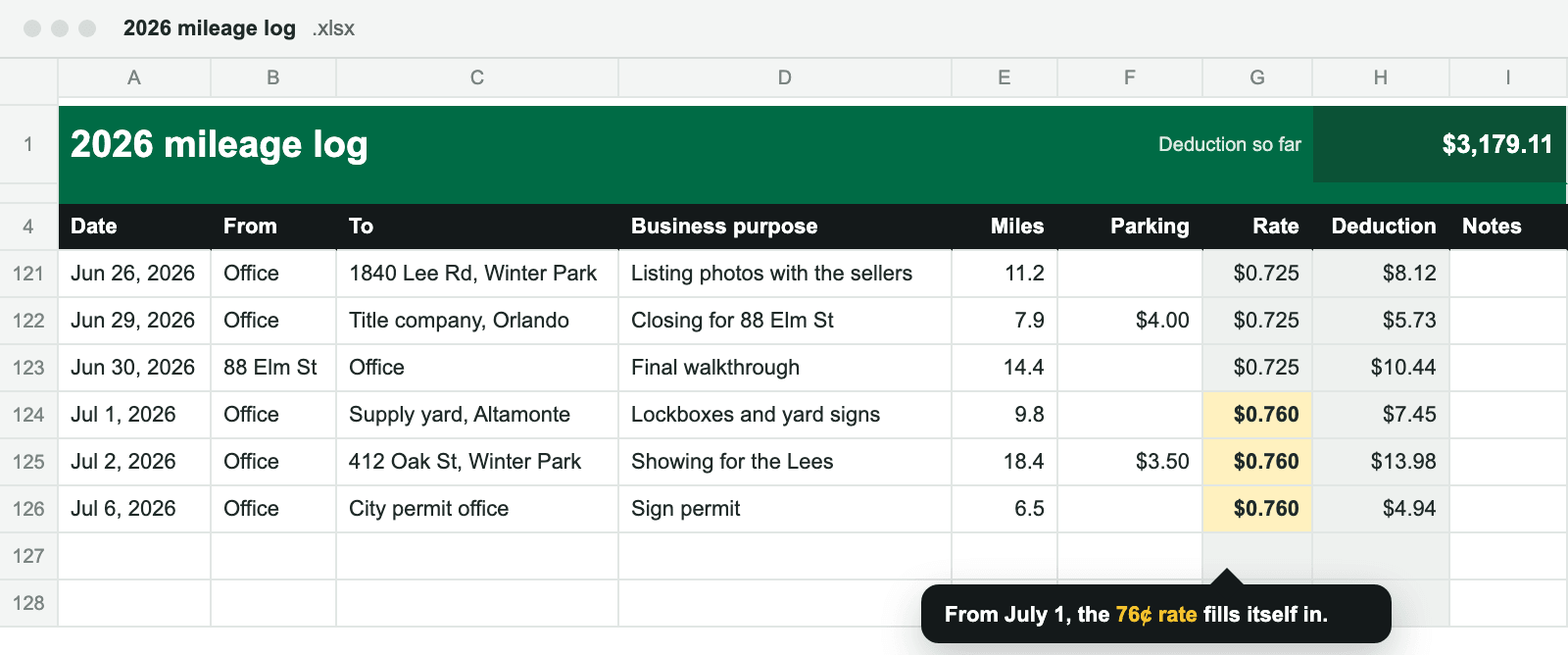
What’s in the spreadsheet
- Log: one row per business drive, with the date, where you started and went, the business purpose, the miles, and any parking or tolls. The rate and deduction fill themselves in.
- Year summary: your odometer at the start and end of 2026, how much of your driving was for business, and the deduction for each half of the year, worked out from each half’s total miles.
- By month: miles, deduction, and parking and tolls for each month and calendar quarter, handy if you pay estimated tax during the year.
- 2026 rates: the two business rates and the day they changed, with links to the IRS notices so you can check them.
- It works in Excel, Google Sheets and Numbers, with no macros.
What’s in the PDF
Two letter-size pages that you can type into in Preview, Acrobat or a browser, or print and fill in by hand. The log page has 18 rows with odometer columns and page totals, so print as many as you need. The year summary has a line for each month, then takes you through both rates: January to June miles at 72.5¢, July to December miles at 76¢, plus parking and tolls.
What the IRS asks you to record
For each business drive: the date, where you went, the business purpose, and the miles. For the year: the car’s total miles, from its odometer, so your business share can be worked out.
A log kept at or near the time of each drive carries the most weight. Filling it in once a week from your calendar works; rebuilding a whole year at tax time is much harder, though it can be done.
Drives between home and your regular place of work are commuting, which is personal, so leave them out. Keep the log and your receipts for at least three years after you file.
Two rates in 2026
The IRS raised the business rate for drives on or after July 1, 2026, from 72.5¢ to 76¢ a mile. A template with one rate for the whole year gets your deduction wrong either way, so this one checks each drive’s date. Adding up a year you didn’t log drive by drive? Use the 2026 mileage calculator.
Questions
Do I need a mileage log to deduct my miles?
Yes. To deduct car expenses, you need records that back up each business drive, and a log kept at or near the time of the drives is the strongest kind. An estimate on its own isn’t enough for car expenses. If you didn’t keep one, here’s how to rebuild a log.
Do I need odometer readings for every drive?
No. The IRS asks for the miles of each business drive and the car’s total miles for the year, which come from the odometer at the start and end of the year. Readings for each drive are optional; the PDF has columns for them if you want them.
Can a round trip go on one line?
Yes. If you drove to a client and back, put it on one line with the miles both ways and the business purpose.
Which rate does a drive on July 1, 2026, get?
76¢ a mile. The new rate applies to drives on or after July 1, and a drive on June 30 gets 72.5¢. The spreadsheet picks the rate from each drive’s date.
Can I log medical or charity miles in it?
It’s built for business miles. Medical driving was 20.5¢ a mile through June 30 and 23.5¢ from July 1, and charity driving is 14¢; the 2026 mileage calculator adds those up.
Will there be a 2027 version?
Yes. The IRS usually announces the next year’s rate in December, and a 2027 version will go up here once it’s published.
Rather not type in every drive?
Tenths logs every drive on its own and gives each one the rate for its date. With Pro, it exports the same log as a PDF or CSV for any month, quarter or year. Your drives stay on your iPhone. Nothing reaches us.
Get Tenths
Free for iPhone, with unlimited automatic drives. Pre-order it now and it downloads to your iPhone on release day. Questions about the template? Email hello@tenthsapp.com.
Pre-order on the App StoreSources
- IRS Publication 463, Travel, Gift, and Car Expenses: what to record (Table 5-1), commuting, and how long to keep records
- Treasury Regulation § 1.274-5T: adequate records, and records made at or near the time
- IRS IR-2025-128 (Notice 2026-10): the rates from January 1, 2026
- IRS Announcement 2026-11 in Internal Revenue Bulletin 2026-29: the rates from July 1, 2026
This is general information, not tax advice. Your situation may differ, so ask a tax professional before you file. You’re welcome to share the templates. Excel, Google Sheets and Numbers are trademarks of Microsoft, Google and Apple; Tenths isn’t affiliated with or endorsed by them.